Add below function in your functions.php file for adding rest api support
add_action('init', 'my_custom_post_type_rest_support', 25);

function my_custom_post_type_rest_support() {
    global $wp_post_types;

    //be sure to set this to the name of your post type!
    $post_type_name = 'stm_staff';
    if (isset($wp_post_types[$post_type_name])) {
        $wp_post_types[$post_type_name]->show_in_rest = true;
        $wp_post_types[$post_type_name]->rest_base = $post_type_name;
        $wp_post_types[$post_type_name]->rest_controller_class = 'WP_REST_Posts_Controller';
    }
}
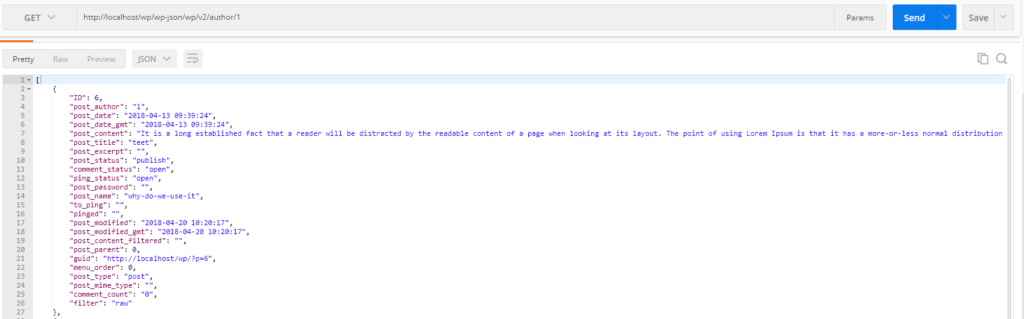
Here is the sample example that displays all posts of author.
//Enter function in functions.php file
function wc_custom_endpoint($data) {
    $posts = get_posts(array(
        'author' => $data['id'],
    ));

    if (empty($posts)) {
        return null;
    }

    return $posts;
}
add_action('rest_api_init', function () {
    //If URL is: http://localhost/wp/wp-json/wp/v2/posts
    register_rest_route('wp/v2', '/author/(?P<id>\d+)', array(
        'methods' => 'GET',
        'callback' => 'wc_custom_endpoint', //Function name
    ));
});
Now enter endpoint in postman